
Every program review I have ever prepared for started the same way: a thread of status emails, a spreadsheet nobody fully trusts, and a slide from last month with dates that are already wrong. The slide takes longer than the meeting. This post is the four-minute version I use now, with the checks I learned the hard way running engineering programs, where a wrong date on a slide is a wrong date in front of a steering committee.
1. Paste the whole thread, not a summary
The temptation is to clean the email up first. Don't. The useful information is in the asides: "Raj says the Payments API needs until Nov 20 (was Nov 6)" carries three facts (an end date, a slip, and the original baseline), and a summary would have kept one of them.
In PMO Pilot, the Create tab takes the raw text. It reads tasks, milestones, owners, status words ("at risk", "slipped", "done") and dependencies ("can't start until the API is done"), and it treats the email's quoted replies and signatures as noise.
2. Check the dates before they touch the slide
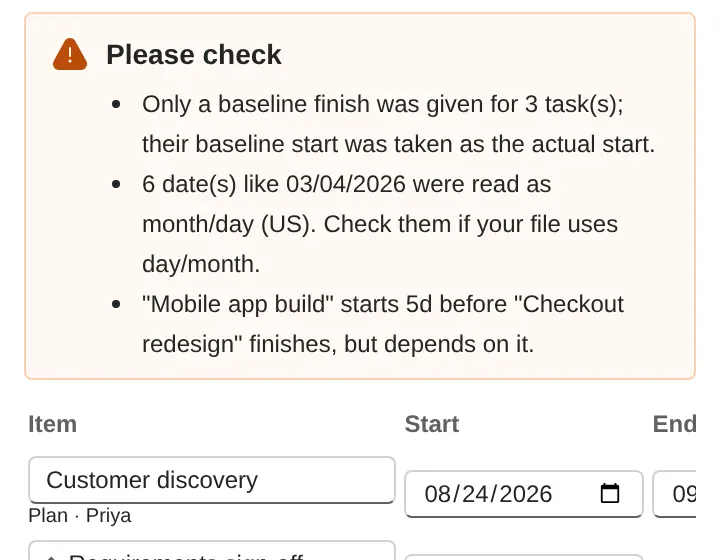
An AI that reads "mid-Q4" will resolve it to a day. Which day is a judgement call, and the review step is where you make it. Every inferred date is listed with the assumption that produced it ("mid-Q4 → Nov 15"). Three things I always check:
- Unyeared dates near New Year. "Dec 7 – Jan 15" must land in the coming year, not the one that just passed. It is the single most common error in hand-made timelines too.
- Fiscal quarters. If your company's year starts in July, "end of Q3" is March 31, not September 30. Say so in the notes ("FY runs Jul–Jun") and the dates follow.
- One-day events. A demo, a sign-off, a gate review: these are milestones, not bars. A two-week bar for a one-hour meeting is how slides start to lie.
Nothing reaches the slide until you press Insert, so this is a cheap habit.
3. Let workstreams become swimlanes
If the email names workstreams ("Design", "Build", "Launch"), keep them. On the slide they become swimlanes, and a steering committee reads swimlanes faster than a flat list: the eye goes to the lane that owns the problem. Items without a workstream sit in an "Other" lane, which is a useful prompt to go and find out who owns them.
4. Make the slide survive next month's update
The reason timeline slides rot is that updating them means redrawing them. The fix is to keep the plan in the slide. PMO Pilot stores the plan inside the presentation; next month you paste the new email, the bars move, and the things you changed by hand, a label you dragged or a bar you recolored, stay where you put them.
Two habits make this work:
- Save a baseline when the plan is approved. From then on, every slip shows as a ghost bar and a "+14d" label, which is the honest version of the story.
- Keep the dates explicit. Every date on the slide reads "Nov 20, 2026", not "Nov 20". It costs a few characters and removes a whole category of "which year?" questions in the room.
The three mistakes that make timeline slides lie
- A bar for a milestone. A gate review is a diamond. If it has a duration, it is not a gate.
- A plan with no baseline. A timeline that only shows the current dates can never show a slip. The slide looks fine every month while the program drifts.
- Text that moved and dates that didn't. When someone drags a label on the slide and the bar stays put, the slide now says two different things. Either the tool keeps labels attached to their bars, or you re-check every label before the meeting.
That is the whole method. The four minutes are mostly spent on the review step, which is where the value is.
Try it on your own notes: PMO Pilot is free to install, with no sign-up.