Now / Next / Later Roadmap template for PowerPoint
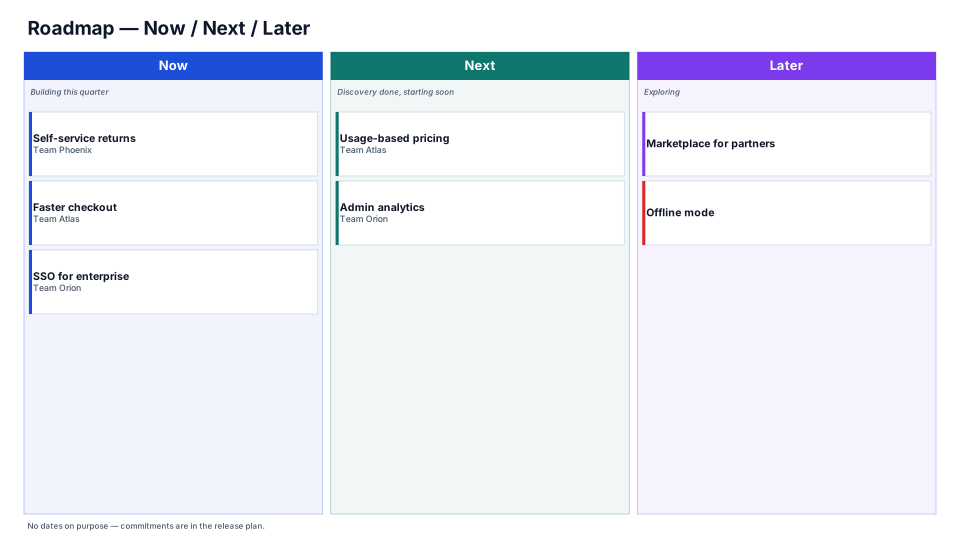
A Now / Next / Later roadmap sorts work by how soon it starts instead of by date: what teams are building now, what's next once discovery is done, and what's still being explored. Use it with customers, sales and leadership when exact dates would turn into promises you can't keep.
Download (.pptx, 14 KB) Fill it from your notes in PowerPoint
The download is the slide above, made of native PowerPoint shapes you can edit. No sign-up. PMO Pilot, the PowerPoint add-in, fills it from your notes and is free to install.
What's on the slide
- Three columns, Now, Next and Later, each with a one-line definition
- One card per initiative, with the team that owns it
- A red edge on cards tagged as a risk
- A footnote saying where the dated commitments live
When to use it
An outcome-based roadmap without dates.
How to make it in PMO Pilot
- Put what you're doing now, next and later in the three columns.
- Write outcomes, not features.
- Revisit monthly and move items left.
Best for
Product managers, Engineering leads, Executives.
Questions
Who came up with Now / Next / Later?
Janna Bastow, co-founder of ProdPad and Mind the Product. She sketched the first version around 2012 as Current / Near term / Future, and the Now / Next / Later labels came later from a customer. The aim was a roadmap stakeholders could read quickly, without the false precision of dates.
Should the columns have time horizons?
Many teams tie Now to the current quarter, as the sample does ("Building this quarter"), and leave Next and Later undated. When someone needs dates, give them a timeline of the Now column only; the Product Roadmap and Release Train looks show it on a dated scale.
Outcomes or features on the cards?
Outcomes where you can: "Faster checkout" says what customers get, while "Checkout v2 API" only says how. Concrete feature names fit the Now column, where the work is already defined; Later should hold problems you're still exploring.
How often should it change?
Review it monthly or each planning cycle, and move items left as they firm up, or drop them. In Edit content, add the card to its new column and delete it from the old one, then Redraw.
More Product & engineering templates
All 53 program diagrams, each a free .pptx download.