
Jira to PowerPoint roadmap: epics and sprints on one slide
Jira's roadmap view is for the team; the quarterly review wants a slide that the VP can edit. PMO Pilot reads a Jira CSV export (Summary, Assignee, Epic Link or Parent summary, Due date, Sprint, Status category) and draws it as native PowerPoint shapes.
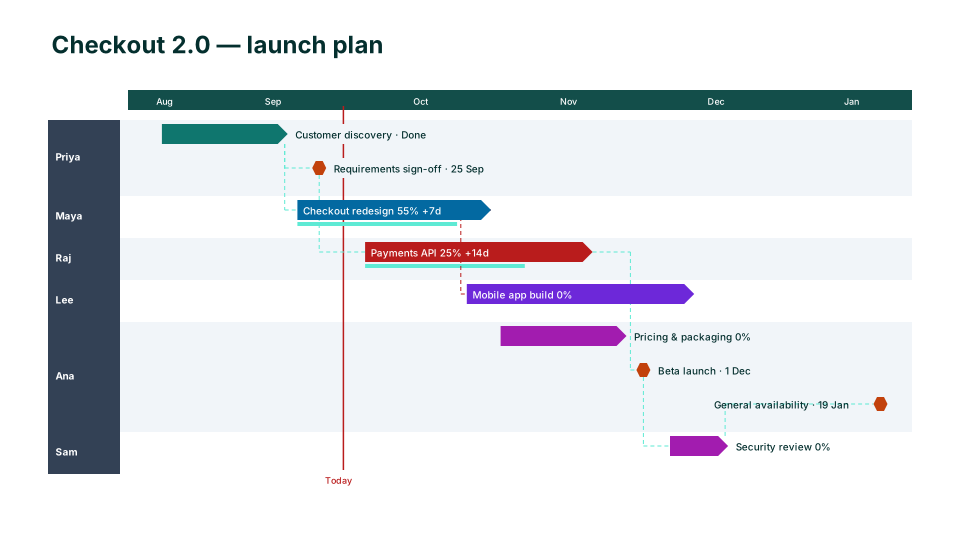
From Jira to the slide
- In Jira, open the issue navigator (Filters → View all issues) and filter to the project, epics or sprint you want on the slide.
- Export → CSV (all fields) or CSV (current fields). Make sure Summary, Assignee, Due date, Parent summary (or Epic Link), Sprint and Status category are included.
- In PowerPoint, open PMO Pilot → Create with AI → Upload Excel / CSV and pick the file (or paste the rows).
- On the review screen, issues with only a due date show as milestones; sprints or epics show as swimlanes.
- Press Insert on slide.
Which columns PMO Pilot reads
| Column in the Jira export | On the slide |
|---|---|
| Summary | the bar or milestone label |
| Issue key | the row id (for links such as 'blocked by') |
| Assignee / Reporter | the owner (email addresses become names) |
| Epic Link / Parent summary / Sprint / Components | a swimlane |
| Due date / Target end | the finish; with no start it becomes a milestone |
| Sprint start / Sprint end | the bar |
| Status category | the color (To Do, In Progress, Done) |
| Is blocked by / Blocked by / Depends on | dependency arrows |
No column mapping step: headers are matched by name, in any order, and the review screen shows exactly what was read before anything touches the slide.
Worth knowing
- Jira issues usually have a due date but no start date. Add a Start date field to the export, or paste a sprint plan with dates, to get bars instead of milestones.
- Export epics only for an executive roadmap; export stories only for a sprint review. Mixing both on one slide reads badly.
- Email-address assignees (priya.shah@acme.com) are shown as 'Priya Shah'.
Questions
Does PMO Pilot connect to Jira Cloud directly?
No. It reads a CSV export, which keeps your Jira credentials out of the add-in and works for Cloud and Data Center alike.
What about Jira's own roadmap and timeline views?
They are good inside Jira. A PowerPoint slide is what the review deck needs, and the slide PMO Pilot draws is editable by people who don't have Jira access.
Can I keep it updated after the sprint moves?
Export again and use Edit → Update from Excel / CSV (Pro). Issues are matched by name, so moved dates move the bars and your manual tweaks stay.
Looks that suit a Jira plan
- Free
Agile Sprints
Agile & delivery - Free
Product Roadmap
Product & engineering 
Release Train
Product & engineering
PI Planning (SAFe)
Agile & delivery