
Design Controls timeline template for PowerPoint (Phase Gates)
A design controls timeline shows a medical device program from design inputs to submission: design, verification and validation, and regulatory work in their own lanes, with the design reviews, design freeze and submission as dated gates. Use it in design reviews, management review and the quality plan, where the dates must match the design and development plan.
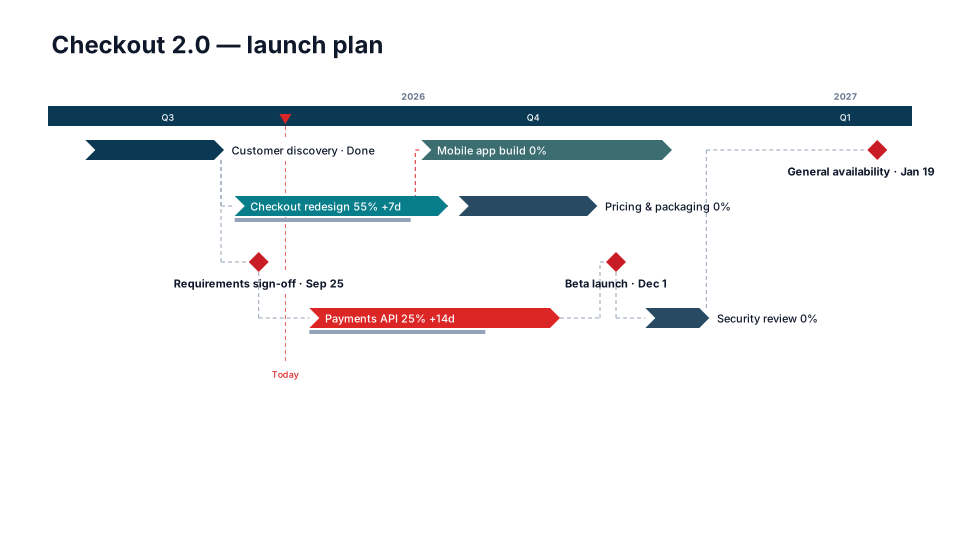
Download (.pptx, 14 KB) Fill it from your notes in PowerPoint
The download is the slide above, made of native PowerPoint shapes you can edit. No sign-up. To draw it from your own dates in the browser, use the free timeline maker. PMO Pilot, the PowerPoint add-in, fills it from notes or a spreadsheet and is free to install.
What's on the slide
- Phases as chevrons: design inputs, design and prototypes, verification, validation, submission prep
- Design reviews, design freeze and the submission as red diamonds with their dates
- Lanes for Design, V&V and Regulatory
- Quarters on a solid band, with years above
- A Today marker on the scale, so reviewers see where the program is
When to use it
Design-controls programs (concept → design → V&V → transfer) with design reviews.
How to make it in PMO Pilot
- Enter the phases as tasks and design reviews as milestones.
- Pick Design Controls (Phase Gates).
- Add a Risks & assumptions table from Style → Add slides & tables if the review needs it.
Best for
R&D, Quality, Regulatory, Core teams.
Bring your data from…
- ExcelExcel to PowerPoint timeline
- Microsoft ProjectMS Project to PowerPoint Gantt chart in a few minutes
- JiraJira to PowerPoint roadmap
- SmartsheetSmartsheet to PowerPoint timeline with baselines and dependencies
- AsanaAsana to PowerPoint timeline
Column names are matched as each tool exports them: no mapping step.
Questions
Which rules do design controls follow now?
Since February 2, 2026, FDA's Quality Management System Regulation (QMSR) incorporates ISO 13485:2016 by reference, so design and development requirements sit in ISO 13485 clauses 7.3.1 to 7.3.10. They apply to all Class II and Class III devices and to specified Class I devices. FDA has said it doesn't expect files for designs developed earlier to be rewritten in ISO 13485 terms.
What goes on the slide, and what stays in the design file?
The slide carries the phases and the dated events auditors ask about: design reviews (clause 7.3.5), verification (7.3.6), validation (7.3.7) and design transfer (7.3.8). Inputs, outputs, review records and the trace matrix stay in the design and development file. Put the plan's document number in the subtitle so reviewers can find it.
Where does risk management go?
ISO 14971 risk management runs through every phase, so give it its own lane: the risk management plan, an analysis update at each design review, and the risk management report before submission. Add a Risks & assumptions table from Style → Add slides & tables for the top open risks.
Can it stay in sync with Microsoft Project?
Yes. In Project, choose File → Save As → XML and upload the file in Create. Tasks, milestones, % complete and the baseline come across. Next month, Update from Excel / CSV matches tasks by Project's task ID, so a renamed task updates the same chevron and your formatting stays.
More MedTech, pharma & regulated templates
Part of Phase-gate templates, with a guide to which one fits which meeting. All 80 timeline looks, each a free .pptx download.
- Free
Regulatory Submission
MedTech, pharma & regulated 
Clinical Study
MedTech, pharma & regulated
Verification & Validation
MedTech, pharma & regulated
Drug Development
MedTech, pharma & regulated
From the blog
How to make a Gantt chart in PowerPoint (and keep it in sync)
Three ways to build a Gantt chart in PowerPoint by hand, a table, a stacked bar chart or shapes, what each can and cannot show, and how to keep it in…
How to make a timeline in PowerPoint (and keep it current)
Three ways to build a project timeline in PowerPoint, SmartArt, shapes and a table, step by step, plus where each breaks once the dates start moving.
How to present a schedule slip to a steering committee
A project manager's method for showing a schedule slip to executives: one slide, the old date next to the new one, the cause, the options and the…