
Implementation Plan template for PowerPoint
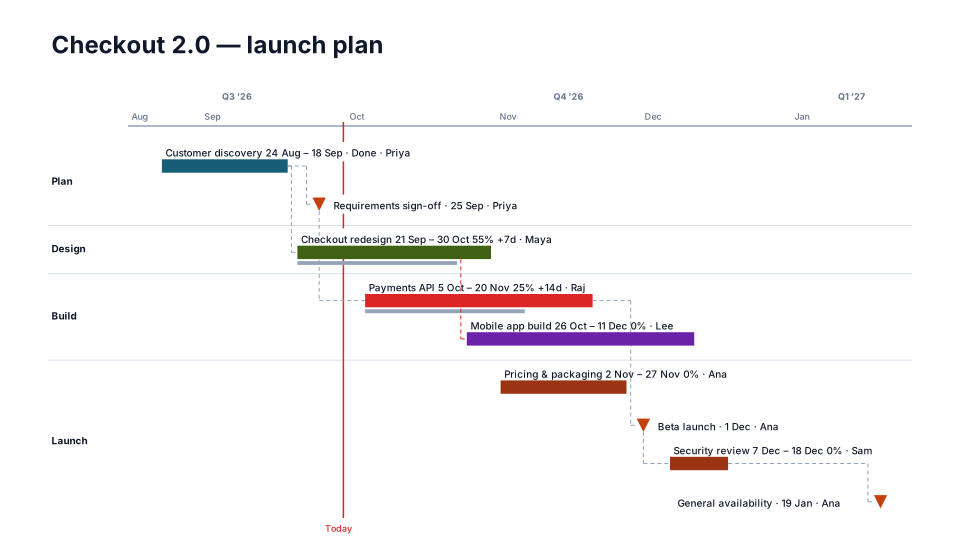
An implementation plan timeline is the working plan a client or sponsor signs off: each workstream in its own lane, every task with its dates, and the steering review and go-live as markers. Use it at kickoff to agree the plan, then save it as the baseline so every later review shows what moved.
Download (.pptx, 14 KB) Fill it from your notes in PowerPoint
The download is the slide above, made of native PowerPoint shapes you can edit. No sign-up. To draw it from your own dates in the browser, open this look in the free timeline maker. PMO Pilot, the PowerPoint add-in, fills it from notes or a spreadsheet and is free to install.
What's on the slide
- A lane per workstream: Engagement, Delivery and Enablement in the sample
- Tasks as bars with their full dates beside them
- The steering review and the pilot go-live as orange triangles
- Months with quarters above, on a thin line scale
- A Today line, so the sponsor sees where the project is
When to use it
The working plan a client signs off, with owners on every bar.
How to make it in PMO Pilot
- Put workstreams in the Workstream column and owners on each task.
- Pick Implementation Plan.
- Save as baseline once signed so later reviews show the slip.
Best for
Implementation leads, Customer success, Clients.
Bring your data from…
- ExcelExcel to PowerPoint timeline
- Microsoft ProjectMS Project to PowerPoint Gantt chart in a few minutes
- JiraJira to PowerPoint roadmap
- SmartsheetSmartsheet to PowerPoint timeline with baselines and dependencies
- AsanaAsana to PowerPoint timeline
Column names are matched as each tool exports them: no mapping step.
Questions
What should an implementation plan slide include?
The workstreams, the tasks the sponsor signs off with their start and end dates, the decision points (steering reviews, go / no-go) and go-live. The detailed plan with hundreds of tasks stays in your project tool; Style → What's on the slide → Custom can leave off everything below an outline level.
How do I show what changed since sign-off?
Press Save as baseline under Edit → Shift dates once the plan is agreed. After that, a task that moves shows its original dates as a ghost bar and its slip in days (+14d), and the Plan vs Actual look shows the drift across the whole plan.
Can the client edit the slide?
Yes. Every bar, date and label is a native PowerPoint shape, so the file opens and edits in PowerPoint without the add-in. If they move things and send it back, Sync from slide in the Edit tab reads their changes into the plan.
Can I build it from Smartsheet or Excel?
Yes. Export the sheet to Excel and upload it with Upload Excel / CSV in Create. Smartsheet's column names (Task Name, Start Date, End Date, Assigned To, % Complete, Predecessors) are read as they are, and a row with one date becomes a milestone.
More Consulting & client templates
Part of Implementation plan templates, with a guide to which one fits which meeting. All 80 timeline looks, each a free .pptx download.
Consulting Navy
Consulting & client
Client Proposal
Consulting & client
3-Year Strategy
Consulting & client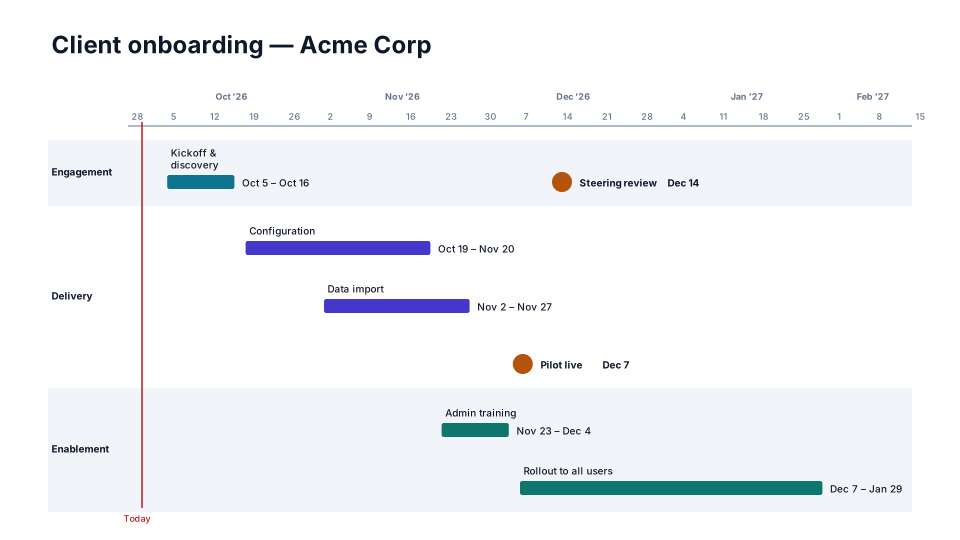
Client Onboarding
Consulting & client
From the blog
How to make a Gantt chart in PowerPoint (and keep it in sync)
Three ways to build a Gantt chart in PowerPoint by hand, a table, a stacked bar chart or shapes, what each can and cannot show, and how to keep it in…
How to make a timeline in PowerPoint (and keep it current)
Three ways to build a project timeline in PowerPoint, SmartArt, shapes and a table, step by step, plus where each breaks once the dates start moving.
How to present a schedule slip to a steering committee
A project manager's method for showing a schedule slip to executives: one slide, the old date next to the new one, the cause, the options and the…