
Marketing Plan template for PowerPoint
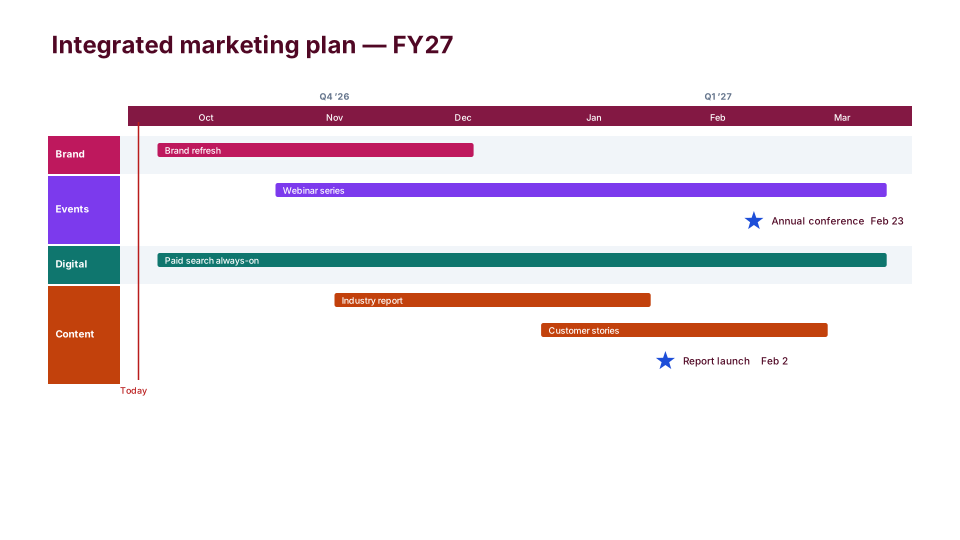
A marketing plan timeline shows a year or a fiscal half of marketing on one slide: each program in its channel's lane (brand, events, digital, content) and launches and events as stars. Use it in the annual planning review or a budget discussion, or to show sales what's coming and when.
Download (.pptx, 14 KB) Fill it from your notes in PowerPoint
The download is the slide above, made of native PowerPoint shapes you can edit. No sign-up. To draw it from your own dates in the browser, use the free timeline maker. PMO Pilot, the PowerPoint add-in, fills it from notes or a spreadsheet and is free to install.
What's on the slide
- One lane per channel or program: Brand, Events, Digital and Content in the sample
- Programs and always-on spend as long bars across the months they run
- Launches and events as blue stars with their dates
- Months on a solid band, with quarters above, following your fiscal year
- Shaded alternate lanes, so a long plan stays easy to read
When to use it
The annual or campaign marketing plan by program: brand, content, events and digital.
How to make it in PMO Pilot
- Put each program in the Workstream column and campaigns as tasks.
- Pick Marketing Plan — months under quarters, a lane per program.
- Add events and launches as milestones.
Tip: For week-by-week content, use Content Calendar instead.
Best for
Marketing directors, Campaign managers, CMOs.
Bring your data from…
- ExcelExcel to PowerPoint timeline
- Microsoft ProjectMS Project to PowerPoint Gantt chart in a few minutes
- JiraJira to PowerPoint roadmap
- SmartsheetSmartsheet to PowerPoint timeline with baselines and dependencies
- AsanaAsana to PowerPoint timeline
Column names are matched as each tool exports them: no mapping step.
Questions
What belongs on this slide, and what doesn't?
Programs, launches and events with their dates, by channel. Individual posts, emails and ad flights belong on a content or campaign calendar. If leadership needs more detail than one slide holds, Split by workstream under Style → Rows & spacing gives each channel its own slide on the same timescale.
Can the quarters follow our fiscal year?
Yes. Under Style → Timescale & dates, set Fiscal year starts to your first month, and the quarters and years follow it. Number fiscal years by then picks FY27 (the year it ends) or FY26 (the year it starts) for July 2026 to June 2027.
Can sales see only what affects them?
Use Style → What's on the slide → Custom to keep only the lanes they need, or only the key milestones. Hidden items stay in the plan and keep updating, so the full plan and the sales version don't drift apart.
Can I build it from our planning spreadsheet?
Yes. Upload the Excel file with Upload Excel / CSV in Create, with columns for the name, start, end and channel (as Workstream). A row with no end date becomes a milestone, so events and launches need only one date.
More Marketing & launch templates
Part of Marketing timeline templates, with a guide to which one fits which meeting. All 80 timeline looks, each a free .pptx download.
Launch Countdown
Marketing & launch- Free
Campaign Calendar
Marketing & launch 
Go-to-Market Plan
Marketing & launch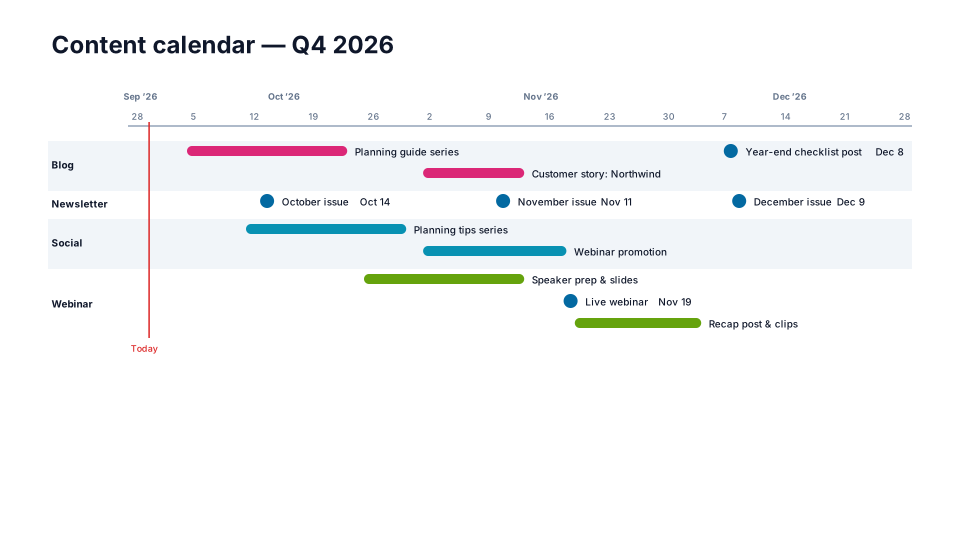
Content Calendar
Marketing & launch
From the blog
How to make a Gantt chart in PowerPoint (and keep it in sync)
Three ways to build a Gantt chart in PowerPoint by hand, a table, a stacked bar chart or shapes, what each can and cannot show, and how to keep it in…
How to make a timeline in PowerPoint (and keep it current)
Three ways to build a project timeline in PowerPoint, SmartArt, shapes and a table, step by step, plus where each breaks once the dates start moving.
How to present a schedule slip to a steering committee
A project manager's method for showing a schedule slip to executives: one slide, the old date next to the new one, the cause, the options and the…